
Is your internet
really slow?
Measure your download speed in about 10 seconds, share it anonymously and see the real speeds of people around you on a map. Find out if it is your line, or the whole area.

Your speed
in 10 seconds
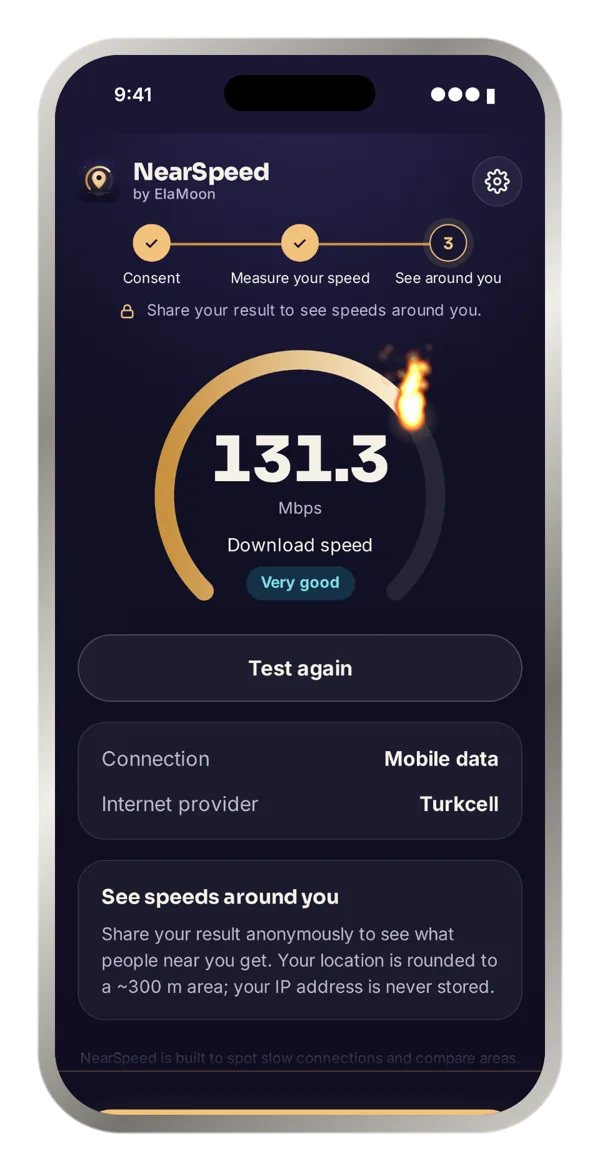
One tap measures your download speed with Measurement Lab (M-Lab), an independent open measurement platform. Your provider and connection type are detected automatically.
- Clear level: very slow, slow, good or very good
- Wi-Fi or mobile data, detected for you
- Your provider is detected automatically, no picking
Real speeds
on the map
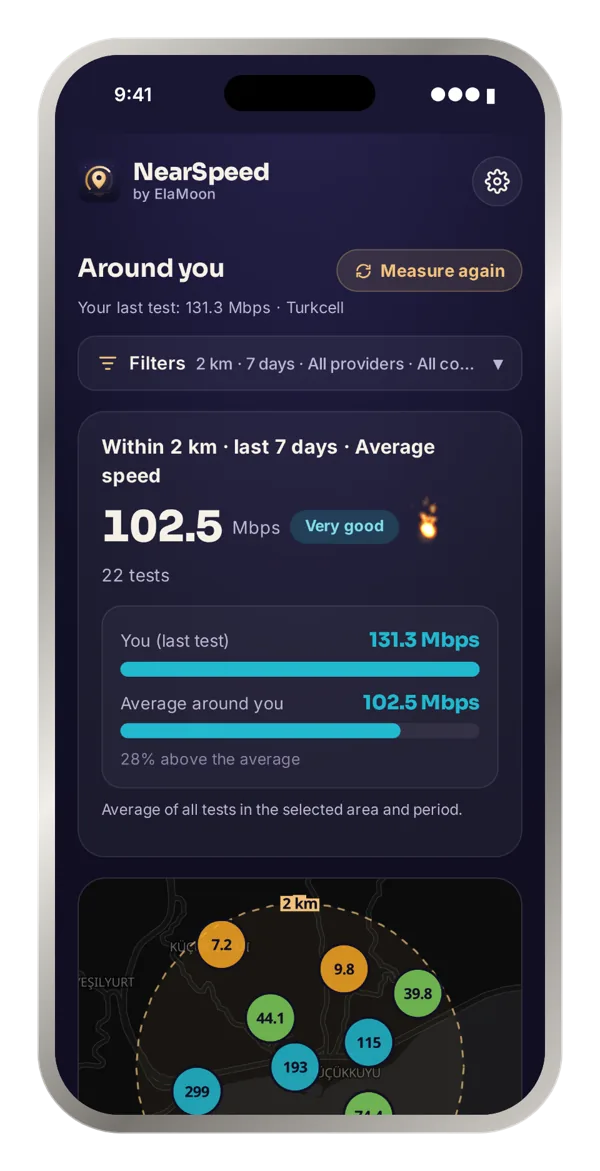
See tests shared by other people near you. Each circle is a ~300 m area, labelled with its average speed and coloured by level.
- Distance from 500 m to 25 km
- Last 7, 30, 90 days or all time
- Average speed and number of tests for the area
Your speed vs.
people around you
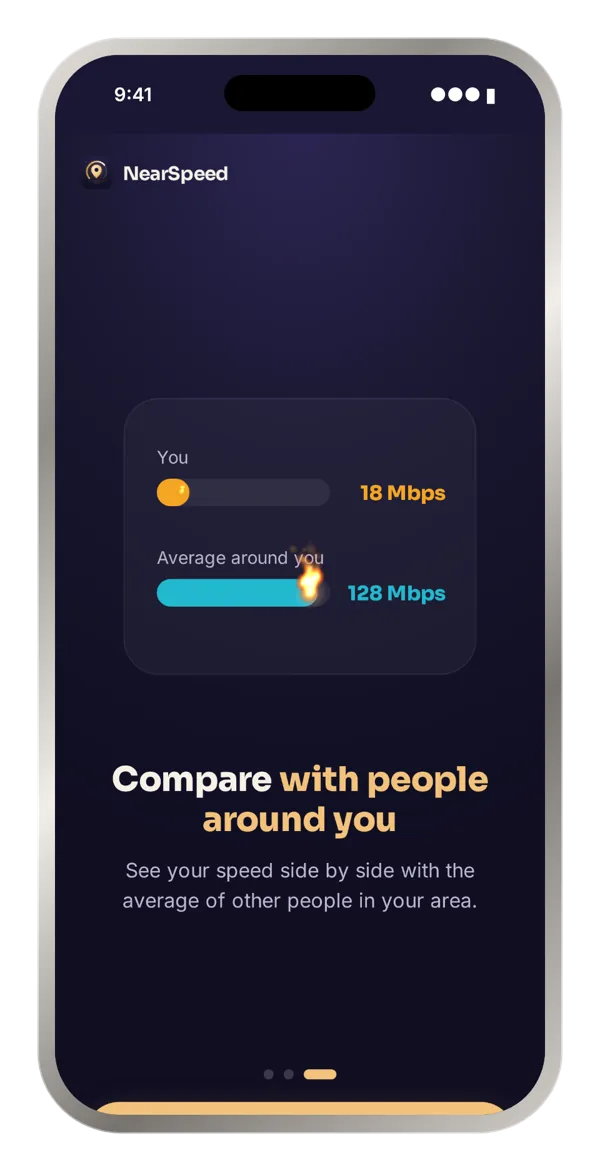
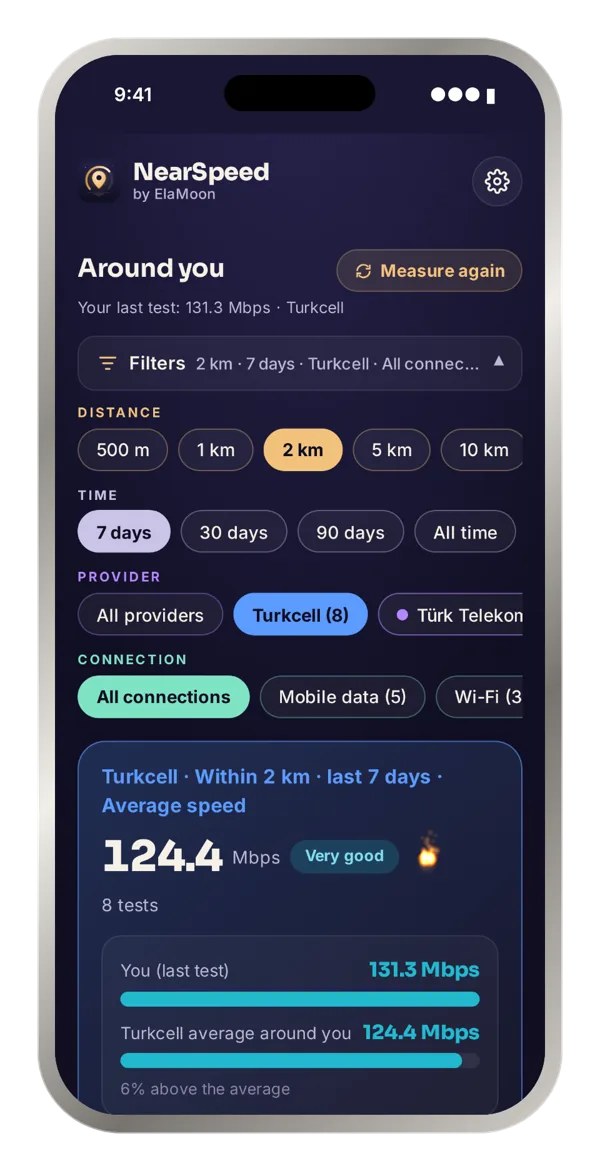
Your last test and the average around you, side by side. Filter by provider and connection type to see who is really faster in your area.
- Provider and Wi-Fi / mobile data filters
- "23% below the average" at a glance
- Decide with real numbers before you switch provider
Every test,
one by one
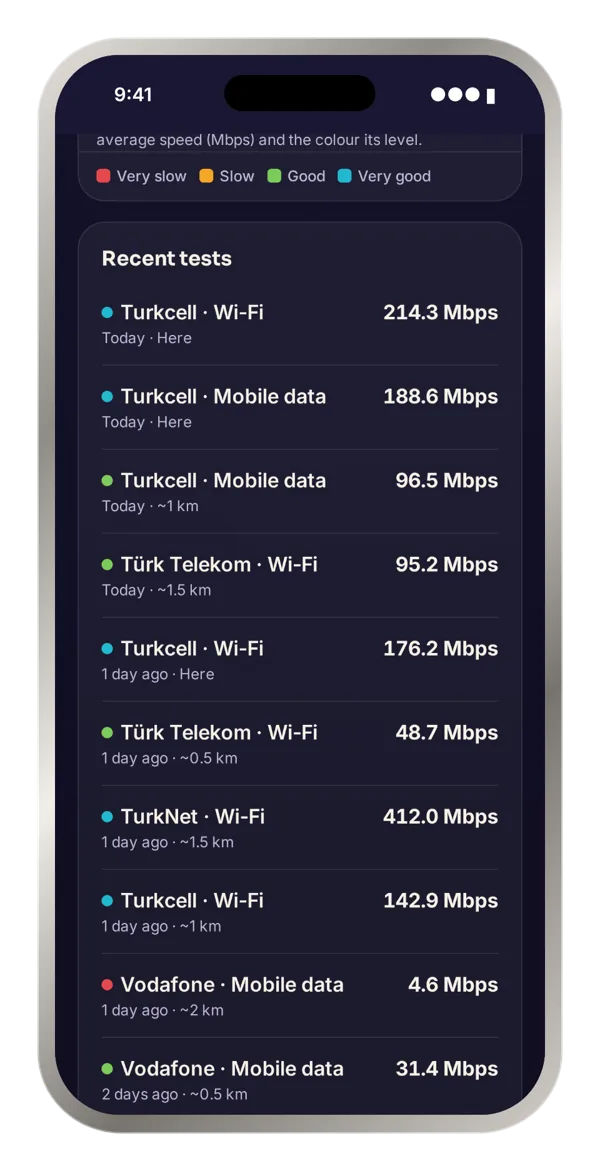
The latest tests in your area with speed, provider, connection type, how many days ago and the approximate distance.
- Distance rounded to 0.5 km, never an exact place
- Updates with every filter you choose
Three steps,
under a minute
Read how NearSpeed works and accept the short notice. No account, no sign-in.
Tap once. Your download speed is measured in about 10 seconds.
Share your result anonymously to unlock the map, the comparison and the latest tests near you.
Anonymous
by design
NearSpeed shares speeds, not people. Nothing you share can be linked back to you.
Your location is rounded on your phone to a ~300 m area before it is sent. Your exact location never leaves your device.
Your IP is only used for a moment to find your provider. It is never written to disk or logs.
No sign-up, no name, no e-mail. Test records contain only speed, provider, connection type, area and time.
Speed tests run on Measurement Lab (M-Lab), which publishes raw test data openly. Read the privacy policy.
Frequently asked questions
About NearSpeed
What is NearSpeed?
NearSpeed is a free iPhone app that measures your internet speed and compares it with real measurements from people around you. It measures your download speed in about 10 seconds, you share the result anonymously, and you see average speeds, providers and connection types in your area on a map. That tells you whether a slow connection is just your line or the whole area.
Is NearSpeed free?
Yes, NearSpeed is completely free. There are no in-app purchases or subscriptions; a small banner ad at the bottom of the screen covers the costs.
Do I need an account or to sign in?
No. NearSpeed has no account, e-mail, password or sign-in. You open the app, accept a short notice and start measuring.
Which devices does NearSpeed run on? Is there an Android version?
NearSpeed is launching on iPhone first. An Android version is planned but not ready yet.
In which countries can I use NearSpeed?
The app is set up to be available on the App Store in all countries except China. The map fills up with measurements shared by users, so how many tests you see depends on your area.
Is NearSpeed affiliated with any provider?
No. NearSpeed is independent and not affiliated with any internet provider. The figures on the map come only from users' own measurements.
Who makes NearSpeed?
NearSpeed is developed by independent developer Saim Gürses under the ElaMoon brand. You can reach us at destek@elamoon.com.
Speed test
How does NearSpeed run the speed test?
The test runs against servers of Measurement Lab (M-Lab), an independent measurement platform that publishes its raw data openly, using the NDT7 protocol. A suitable M-Lab server near you is picked automatically and your download speed is measured for about 10 seconds.
What does NearSpeed measure? Does it measure upload and ping?
NearSpeed measures download speed (Mbps) only. Upload is not measured, to keep the test short and use less data. Download speed is the number you feel most in everyday use.
How much data does a speed test use?
The test runs for about 10 seconds, so data use depends on your speed: roughly 12 MB at 10 Mbps, 60 MB at 50 Mbps and 125 MB at 100 Mbps. Keep this in mind on a limited mobile data plan.
What do the speed levels mean?
Results are shown in four levels: under 5 Mbps very slow, 5–25 Mbps slow, 25–100 Mbps good, and 100 Mbps or more very good. The colours of the circles on the map follow the same levels.
Why is my result lower than my plan or other speed tests?
NearSpeed is built to spot slow connections and compare areas, not to max out very fast lines. It uses a single connection to independent M-Lab servers, so on very fast lines (hundreds of Mbps) the result can look lower than your plan. Providers' own tests usually use servers inside their own network and several connections. Results are estimates.
Why doesn't it work on VPN or office Wi-Fi?
Your provider is detected from the network you are on. On VPNs, data centres and shared corporate networks the provider and location would be wrong, and those results would mislead everyone. So NearSpeed does not run there. Use mobile data or your home Wi-Fi.
How is my provider detected?
From the network number (ASN) your connection belongs to, looked up in an offline database on our own server. Providers are shown at company level, for example Turkcell, Türk Telekom, Vodafone or TurkNet. Whether you are on Wi-Fi or mobile data is detected automatically too.
How do I get a more accurate result?
On Wi-Fi, stay close to your router, pause other downloads and video streams during the test, and run a few tests at different times of day. To tell whether the problem is your Wi-Fi or your line, also test with mobile data in the same spot.
Map and comparison
Why do I need to share my result to see speeds around me?
NearSpeed's map is made entirely of measurements shared by users. When everyone shares, the pool grows and the picture of your area gets closer to reality. Sharing is anonymous; no name, account or IP address is stored.
What do the circles on the map mean?
Each circle is an area of about 300 metres. It shows the average speed of tests in that area, and its colour shows the speed level. As you zoom out, nearby circles merge and their average is weighted by the number of tests; tap one to zoom in and split it.
Which filters are there?
You can choose a distance from 500 metres to 25 kilometres and a period of the last 7, 30 or 90 days or all time. You can also filter by provider and by connection type (Wi-Fi or mobile data). The summary, the map and the latest tests list all follow your filters.
How do I compare my speed with my area?
After you share your test, the nearby screen shows your last test and the average for the selected area as bars side by side, so you see differences like “23% below the average” at a glance. Filtering by the same provider and connection type makes the comparison fairer.
There are no tests in my area. What should I do?
It means nobody has shared a test there yet. You can add the first one by sharing your result, or widen the distance or the period to look at a larger area.
How are fake or wrong measurements prevented?
Unrealistically high speeds are rejected, the number of results that can be shared from the same small area in a short time is limited, and tests from VPN and data-centre networks are not accepted. These measures make it hard for one person to skew the map.
Privacy
Can other people see where I live?
No. Your location is rounded on your phone to an area of about 300 metres before it is sent, the list shows distance rounded to 0.5 km, and no name, account or IP address is stored.
What data is stored?
For each shared test only the download speed, the time, the connection type, the provider and its network number, the rounded approximate location and the app version are stored. Records are anonymous: they contain no name, e-mail, device ID or IP address.
Why does NearSpeed ask for location permission?
Location is used only while you use the app, to show tests around you and place your shared result on the map. Your exact location never leaves your device, and you can turn the permission off in iPhone Settings at any time.
How long is data kept, and can I delete it?
Anonymous test records are kept for up to 24 months. Because they cannot be linked to you, it is not possible to find and delete one person's records. See the privacy policy for details.
Do the ads track me?
The banner ad at the bottom of the screen is served by Google AdMob. NearSpeed does not ask for permission to track you across other apps, so your iOS advertising identifier is not shared. Users in Europe are asked for consent through Google's consent message. Your speed results and location are never sent to Google.
Slow internet
Why is my internet slow?
The most common causes are a weak Wi-Fi signal or being far from the router, many devices using the connection at once, congestion at busy hours, an old router or cables, copper lines and faults on the provider's side. By comparing your result with people around you in NearSpeed you can tell whether the problem is yours or the whole area's.
How can I tell if the problem is me or my provider?
Share your test and look at the average around you with the same provider and connection type selected. If your speed is far below the local average, the problem is probably your line, router or Wi-Fi. If everyone in the area is slow, it may be a local or provider-wide issue.
Why is my internet slower in the evening?
In the evening more people use the same infrastructure, and because capacity is shared, speeds can drop. In NearSpeed you can use the period and area filters to see whether the slowdown affects the whole area.
What should I check before switching provider?
In NearSpeed, pick a distance and period and use the provider filter to see each provider's average speed and number of tests in your area. Averages based on many tests are more reliable than a handful. Compare Wi-Fi and mobile data separately.
What is Mbps, and how is it different from MB/s?
Mbps means megabits per second, the unit internet speeds are given in. MB/s, which you see when downloading files, means megabytes per second. One byte is 8 bits, so 100 Mbps is about 12.5 MB/s.
How many Mbps do I need?
It depends on how you use it. As a rule of thumb, 25 Mbps or more is usually enough for one person's HD video, video calls and everyday use. If several people at home stream high-resolution video, download games or upload large files at the same time, 100 Mbps or more is more comfortable.
Slow internet?
See if it's just you
Measure, share anonymously and compare with people around you in under a minute.
Download on theApp Store